
Excel Interview Questions for Freshers (With Answers & Examples)
Main Headlins
ToggleBasic Excel knowledge is a prerequisite for almost every interview these days, whether you’re applying for a position in Data Entry, Office Assistant, Accountant, BPO jobs, internship, or Analyst.
This is a common error of freshers. They attend only to theoretical issues and do not consider any practical skills in Excel. Well, companies do not require freshers to know everything; they just want you to know the basics right.
For freshers preparing for their first job interview, this list of Excel interview questions for freshers with easy explanations, examples, and beginner answers covers the important Excel interview questions.
What is MS Excel?
Microsoft Excel is a spreadsheet software used to organize, calculate, analyze, and visualize data.
It is widely used in:
- Offices
- Schools and colleges
- Banks
- Startups
- Accounting firms
- Data entry jobs
- HR departments
- Sales reporting
In India, Excel is one of the most demanded software skills for freshers because almost every office uses spreadsheets for daily work.
Why Excel Skills Matter in Interviews
Recruiters ask Excel questions because they want to check whether you can:
- Handle office data
- Create reports
- Use formulas correctly
- Organize information
- Work faster using shortcuts
- Solve basic business problems
Even small companies now expect freshers to know Excel basics.
For example:
- A sales executive may need to prepare monthly sales reports.
- A receptionist may need to manage records.
- A data entry operator may need to clean and organize data.
- An accountant may need formulas for calculations.
Basic Excel Interview Questions for Freshers
1. What is a cell in Excel?
A cell is the box where data is entered in a worksheet.
Example:
- A1
- B5
- C10
Each cell has a unique address based on row and column.
2. What is a workbook?
A workbook is an Excel file that contains one or more worksheets.
Example:
If you save a file named Salary_Report.xlsx, That entire file is called a workbook.
3. What is a worksheet?
A worksheet is a single spreadsheet page inside a workbook.
By default, Excel provides multiple worksheets.
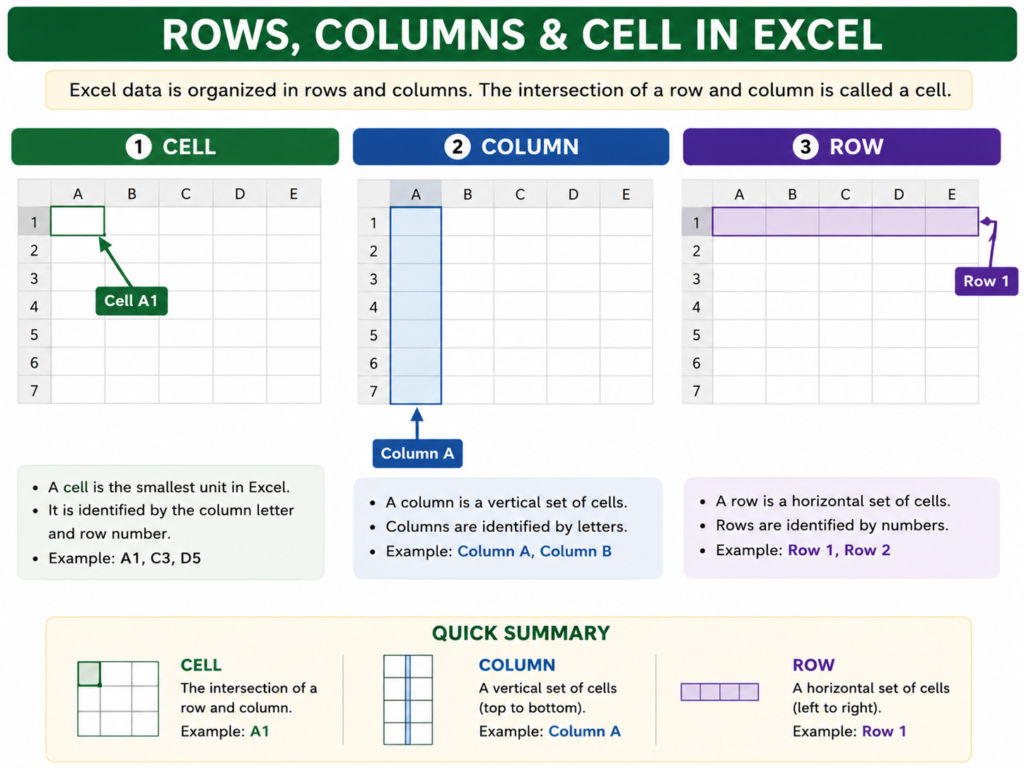
4. Difference between rows and columns?
| Rows | Columns |
|---|---|
| Horizontal | Vertical |
| Numbered (1,2,3) | Lettered (A, B, C) |
5. What is the use of the AutoSum feature?
AutoSum quickly adds numbers using the SUM formula.
Example:
=SUM(A1:A10)6. What are Excel formulas?
Formulas are expressions used to perform calculations.
Example:
=A1+B17. What is the difference between a formula and a function?
| Formula | Function |
|---|---|
| User-created calculation | Predefined calculation |
Example: =A1+B1 | Example: =SUM(A1:A5) |
8. What is the Ribbon in Excel?
The Ribbon is the top menu area containing tabs like:
- Home
- Insert
- Data
- Formula
- View
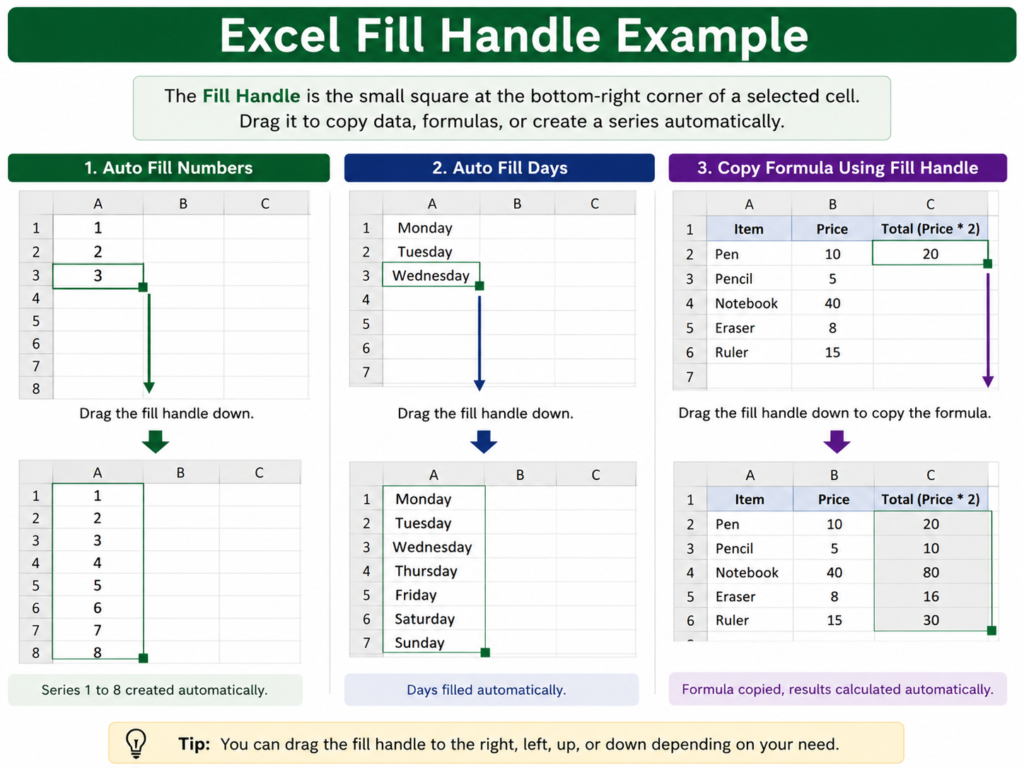
9. What is the Fill Handle?
The Fill Handle is the small square at the bottom-right corner of a selected cell used for copying formulas or patterns.
10. What is Freeze Panes?
Freeze Panes keeps rows or columns visible while scrolling.
Useful in large datasets.
MS Excel Interview Questions and Answers on Formulas
11. What is the SUM function?
The SUM function adds numbers.
=SUM(A1:A5)Example:
Adds all values from A1 to A5.
12. What is the AVERAGE function?
It calculates the average value.
=AVERAGE(B1:B10)13. What is the MAX function?
Returns the highest value.
=MAX(C1:C10)14. What is the MIN function?
Returns the smallest value.
=MIN(C1:C10)15. What is the IF function?
The IF function checks a condition.
=IF(A1>=40,"Pass","Fail")Example:
If marks are greater than or equal to 40, it shows “Pass”.
16. What is COUNT in Excel?
COUNT counts cells containing numbers.
=COUNT(A1:A10)17. Difference between COUNT and COUNTA?
| COUNT | COUNTA |
|---|---|
| Counts numeric cells only | Counts all non-empty cells |
18. What is CONCATENATE?
It joins text from different cells.
=A1&B1or
=CONCAT(A1,B1)19. What is TRIM used for?
TRIM removes extra spaces from text.
Useful in data cleaning.
20. What is the LEN function?
LEN counts characters in a cell.
=LEN(A1)Excel Functions Interview Questions
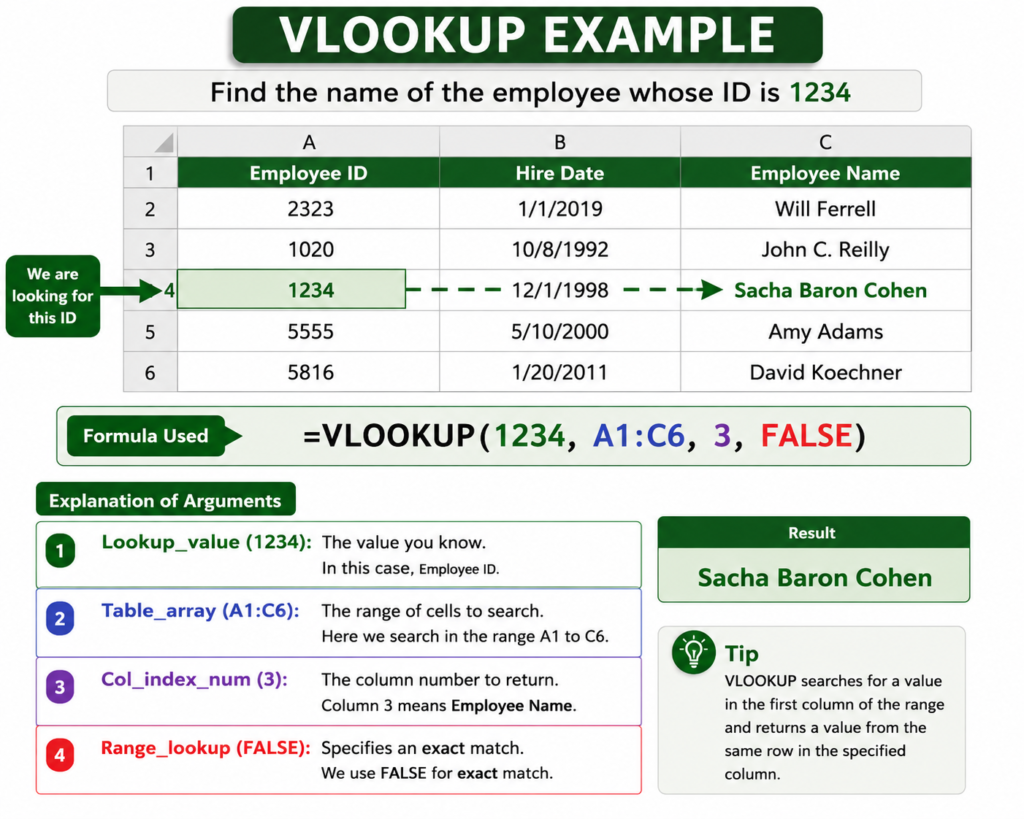
21. What is VLOOKUP?
VLOOKUP searches for a value vertically in a table.
Example:
=VLOOKUP(101,A1:D10,2,FALSE)It searches employee ID 101 and returns related data.
This is one of the most important Excel formulas interview questions in interviews.
22. What are the limitations of VLOOKUP?
- Searches only left to right
- Slower in large data
- Breaks if columns are deleted
23. What is XLOOKUP?
XLOOKUP is the modern version of VLOOKUP.
Advantages:
- Searches both directions
- More flexible
- Easier syntax
Example:
=XLOOKUP(101,A1:A10,B1:B10)24. What is HLOOKUP?
HLOOKUP searches horizontally.
25. What is INDEX and MATCH?
INDEX + MATCH is an advanced alternative to VLOOKUP.
It is faster and more flexible.
Pivot Table Interview Questions
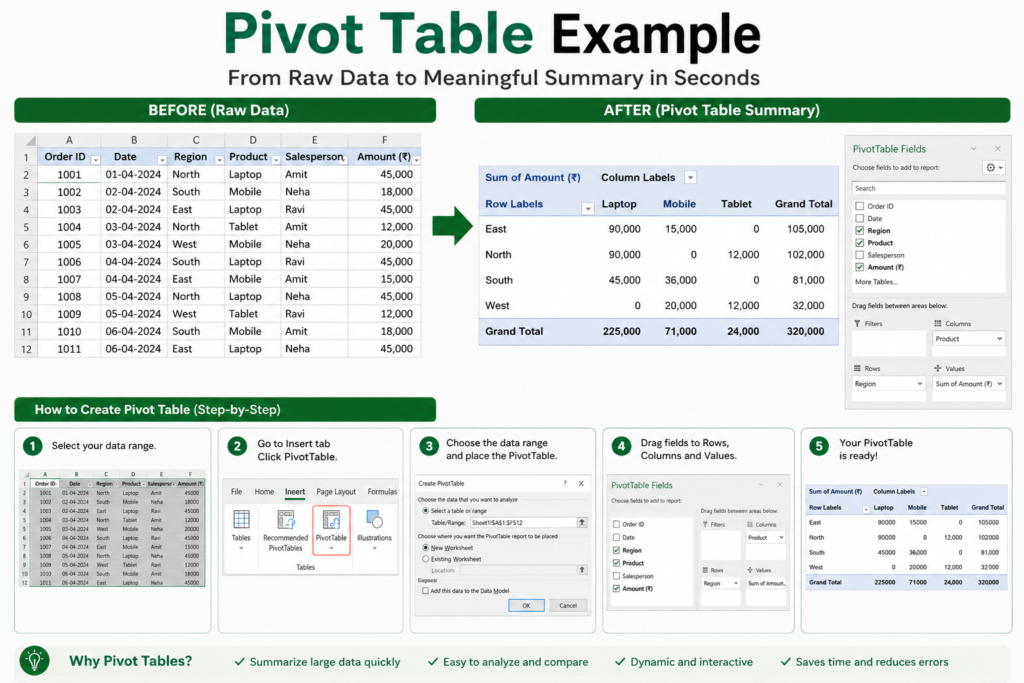
26. What is a Pivot Table?
A Pivot Table summarizes large amounts of data quickly.
Example:
A company sales sheet can be summarized by:
- City
- Product
- Month
- Employee
27. Why are Pivot Tables important?
They help:
- Analyze data quickly
- Create reports
- Find trends
- Save time
Also Read: How to Use Pivot Tables in Excel: Best Beginner-to-Advanced Guide
28. How do you create a Pivot Table?
Steps:
- Select data
- Go to Insert
- Click Pivot Table
- Choose fields
29. What is the use of slicers in Pivot Tables?
Slicers are visual filters used for easy data filtering.
30. Can Pivot Tables update automatically?
No. You must refresh them manually or use settings/macros.
Excel Interview Questions on Charts and Formatting
31. What are charts in Excel?
Charts visually represent data.
Types:
- Bar chart
- Pie chart
- Line chart
- Column chart
32. When should you use a pie chart?
Pie charts are useful for percentage distribution.
Example:
Department-wise budget allocation.
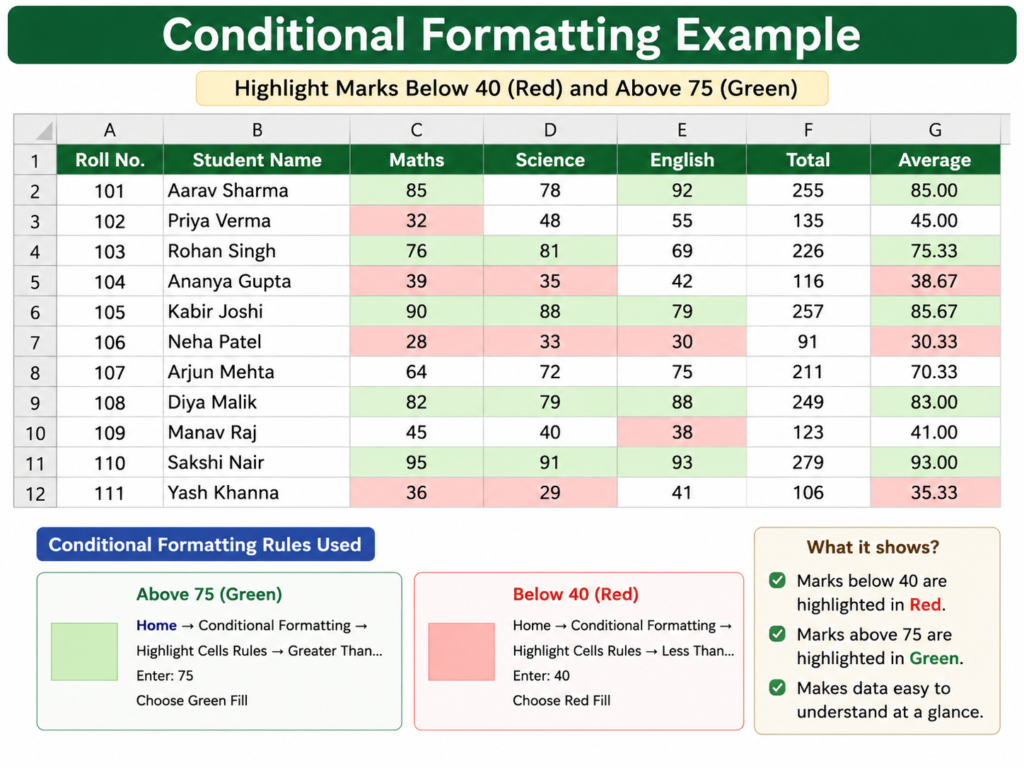
33. What is Conditional Formatting?
Conditional Formatting changes cell appearance based on conditions.
Example:
Highlight marks below 40 in red.
34. Why is Conditional Formatting useful?
It helps identify:
- Duplicate values
- Low performance
- High sales
- Missing data
Excel Shortcut Interview Questions
35. What is the shortcut for copy?
Ctrl + C36. What is the shortcut for paste?
Ctrl + V37. Shortcut to save a file?
Ctrl + S38. Shortcut to find data?
Ctrl + F39. Shortcut to create a new workbook?
Ctrl + N40. Shortcut to edit a cell?
F2Interviewers often ask shortcut questions because they show practical efficiency.
Advanced Excel Interview Questions
41. What are macros in Excel?
Macros automate repetitive tasks using recorded actions or VBA.
42. What is data validation?
Data Validation restricts what users can enter into cells.
Example:
Allow only numbers from 1 to 100.
43. What is the difference between absolute and relative references?
| Relative | Absolute |
|---|---|
| Changes when copied | Remains fixed |
Example:
A1vs
$A$144. What is a named range?
A named range gives a custom name to selected cells.
Example:
Sales_Data
45. What is Flash Fill?
Flash Fill automatically detects patterns and fills data.
Example:
Separating first names and last names.
Excel Interview Questions for Data Entry Jobs
46. How do you remove duplicate values?
Using:
Data → Remove Duplicates
47. How do you sort data in Excel?
Use:
Data → Sort A to Z or Z to A
48. How do you filter data?
Use the Filter option under the Data tab.
49. How do you protect an Excel sheet?
Review → Protect Sheet
50. How do you recover an unsaved Excel file?
Use:
File → Info → Manage Workbook → Recover Unsaved Workbooks
Excel Viva Questions
These are commonly asked in practical exams and interviews.
Quick Viva Questions
- What is the default file extension of Excel?
.xlsx
- What is the intersection of a row and column called?
- Cell
- Which function is used to find averages?
- AVERAGE
- Which symbol starts a formula?
=
- What is the shortcut to open Excel?
- Depends on system settings
Tips to Crack Excel Interviews
Most students prepare only theory. That is a mistake.
Interviewers prefer candidates who can actually use Excel.
Here’s what you should do instead:
1. Practice Daily
Even 30 minutes daily is enough.
Practice:
- Formulas
- Formatting
- Tables
- Sorting
- Filters
2. Learn Through Real Examples
Create:
- Student mark sheets
- Monthly expense trackers
- Attendance sheets
- Sales reports
This improves confidence.
3. Focus on Important Functions
Especially:
- IF
- SUM
- VLOOKUP
- COUNTIF
- XLOOKUP
- Pivot Tables
4. Learn Keyboard Shortcuts
Shortcuts save time and impress interviewers.
5. Prepare Practical Questions
Some interviewers give live Excel tasks.
Example:
“Calculate total salary after bonus.”
If you panic during practical tests, theoretical knowledge becomes useless.
6. Do Mock Interviews
Practice answering aloud.
This improves communication and confidence.
Real-World Example for Indian Students
Imagine you work in a coaching institute in Delhi.
The institute has:
- 500 student records
- Fee payments
- Attendance data
- Exam marks
Excel helps you:
- Calculate totals
- Track unpaid fees
- Create reports
- Identify top students
- Generate charts
This is why employers value Excel skills even in entry-level jobs.
Frequently Asked Questions (FAQ)
Is Excel difficult for beginners?
No. Basic Excel can be learned within a few weeks with regular practice.
Which Excel topics are most important for freshers?
Focus on:
- Formulas
- Sorting
- Filtering
- Pivot Tables
- VLOOKUP
- Shortcuts
Is Excel asked in every interview?
Not every interview, but most office-related jobs require basic Excel knowledge.
What is the best way to practice Excel?
Practice using real datasets and office-style tasks instead of only watching tutorials.
Which Excel version should I learn?
Learn modern versions like:
- Excel 2019
- Excel 2021
- Microsoft 365
Conclusion
Excel is no longer an optional skill for freshers. It is one of the most practical and job-focused skills you can learn today.
The good news is that interviewers usually do not expect advanced expertise from beginners. They mainly check whether you understand:
- Basic formulas
- Data handling
- Shortcuts
- Tables
- Simple analysis
If you consistently practice the questions covered in this guide, you will already be ahead of many candidates who only memorize answers without understanding Excel practically.
Instead of trying to learn everything at once, focus on mastering the basics first. Once your fundamentals become strong, advanced Excel becomes much easier to learn.
For Indian students preparing for their first job, internships, office roles, or data entry interviews, strong Excel knowledge can genuinely improve employability and confidence.